.svg "truvio_logo")





The Problem
The aftermarket opportunity is there. Most manufacturers aren't capturing it.
Spare parts and aftermarket services typically carry higher margins than the original equipment sale — and they recur for the lifetime of every machine in the field. But capturing that revenue depends on making it easy to order. When the experience is a phone call, an email, or a printed catalog, a significant share of orders never happens: dealers source parts elsewhere, customers delay, and revenue walks out the door.
A self-service portal connected to your ERP removes that friction. The result is more orders placed, fewer placed incorrectly, and aftermarket revenue that reflects the size of your installed base — not just the willingness of your support team to handle calls.
- Aftermarket revenue left on the table
When ordering is difficult, dealers and customers source parts from third-party suppliers or simply delay. Every machine in the field is a recurring revenue opportunity — friction determines how much of it you actually capture. - The wrong part gets ordered
Without a structured way to navigate machine components, dealers and customers guess from printed catalogs or memory. Wrong parts mean returns, delays, and equipment staying down. - Product data lives in too many places
Parts catalog, stock levels, pricing, and documentation are all in different systems. The people who need the information can't get to it — or they get yesterday's version. - Every portal project starts from zero
There's no standard way to deliver spare parts capability on top of existing platform investments. Each customer engagement becomes a bespoke build — expensive to sell, expensive to deliver, and hard to maintain.
From machine to ordered part — without calling anyone.
The experience your dealers and customers have when ordering parts reflects directly on your brand — long after the original equipment sale. A portal that makes identification and ordering fast and accurate is a service differentiator, not just an operational convenience. Every step below is one your customers do themselves, without waiting for someone on your team to respond.

1. Find the machine
Users start from the machine catalog — browsing by model family or searching by serial number to get straight to the right configuration.
2. Navigate the structure
The machine opens into its component hierarchy — assembly, sub-assembly, part — in a clear, browsable structure that mirrors how the equipment is actually built.
3. Identify the part
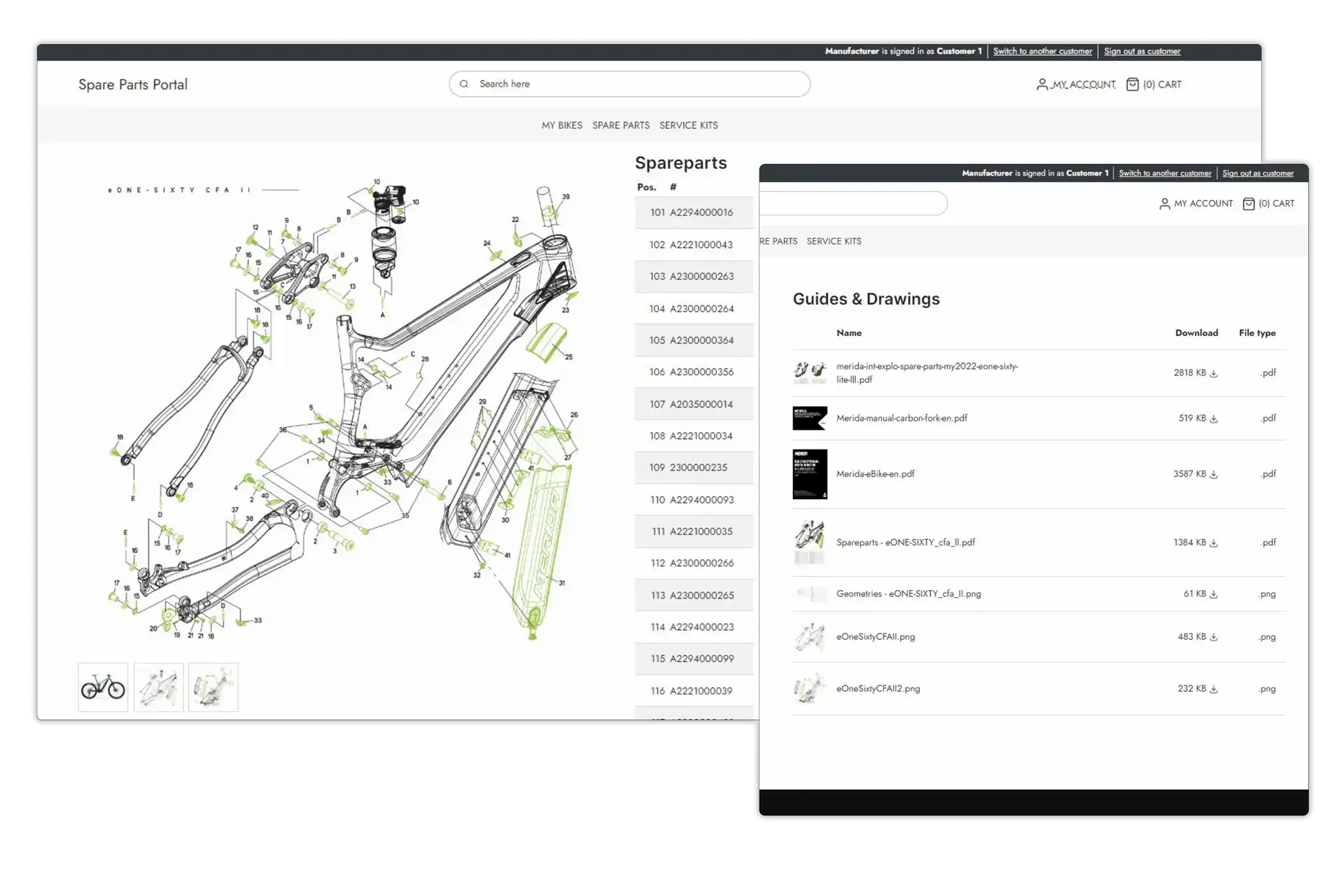
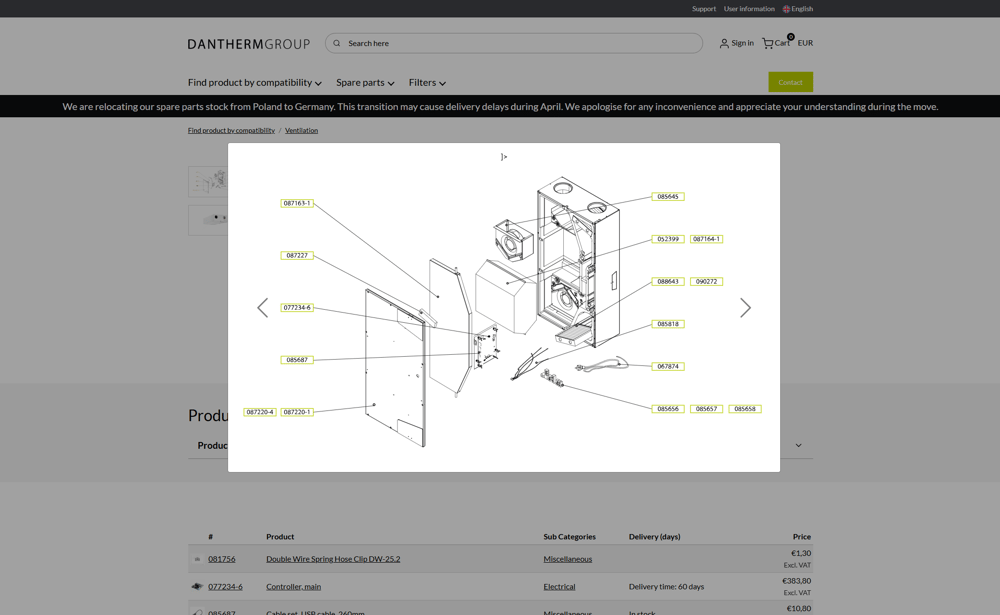
Interactive exploded diagrams let users click directly on the part they're looking for. The diagram and the parts list stay in sync — click either one, the other follows.
4. Check availability
Part detail shows current pricing and stock levels, pulled directly from your ERP. The right price for the right customer, without a sales rep in the middle.
5. Order
Add to cart and place the order — straight into your ERP. No email, no rep, no risk of a part number transcribed incorrectly.
Customer Case
Dantherm Group Spare Parts Portal
Dantherm Group is one of Europe's leading manufacturers of climate control equipment. Their spare parts portal — built on Truvio Commerce (DynamicWeb) and integrated with Microsoft Dynamics 365 Finance & Operations — turned a manual, error-prone ordering process into a self-service experience that now handles the majority of their aftermarket business.
- 60% of spare parts sales now placed through the portal
- Fully integrated with Microsoft Dynamics 365 F&O - live pricing, stock, and automated order flow
- 24/7 Self-service ordering for dealers and customers worldwide

Features:
- Machine & Parts Navigation
Users browse from machine family down through assemblies to individual parts — or jump straight to a component using search. The structure is built from your product data, not a separate system. - Interactive Exploded Views
Diagrams and parts lists work together. Click a component in the diagram to find it in the list. Click a part in the list to find it in the diagram. Identification errors drop. - Live Pricing & Stock
Pricing and availability come directly from your ERP — segmented by dealer group or customer type, so every user sees the right number for their account. - Complete Product Information
Descriptions, images, service manuals, technical specifications, safety certificates — all published through your PIM and surfaced automatically on the right part page. One place to maintain, everywhere it's needed. - Role-based Access
Dealer service technicians, parts managers, counter staff, end customers, and manufacturer admins each see what they need and nothing they shouldn't. Pricing tiers, ordering rights, and catalog management controlled by role. - Ordering Integrated with Your ERP
Orders placed in the portal go straight into your ERP fulfillment flow. No manual handoff, no re-entry, no opportunity for the wrong part number to slip through. - Catalog Health & Data Readiness
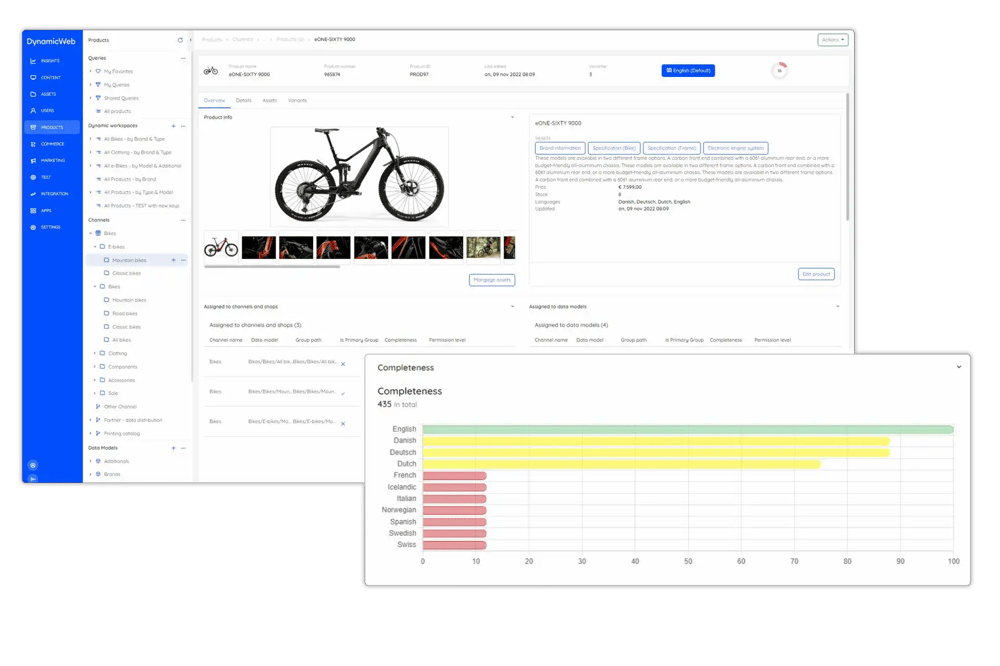
Before go-live, a completeness dashboard shows which parts are missing images, descriptions, or ERP mappings. Data gaps are visible and actionable — before your dealers find them instead. - Consumables & Replenishment
Filters, fluids, wear parts, and service kits sit alongside spare parts in the same catalog. Dealers and customers can reorder on a schedule without navigating a BOM — a familiar webshop experience for the parts they buy regularly. - Manuals, Certificates & Documentation
Service documentation is published through your product information system and linked directly to the relevant part or machine. Dealers and customers always find the right version — not a binder from three years ago.
What it does
Everything your dealers and customers need to order parts. All in one place.
Truvio's spare parts portal brings together your product catalog, machine structure, pricing, stock, and documentation in a single self-service experience. Native integration with Dynamics 365 F&O and Business Central means the data your ERP holds is the data your users see — no exports, no sync delays, no separate catalog to maintain.

The machine is the beginning. The aftermarket is the business.
For most equipment manufacturers, the original sale is the start of the revenue relationship — not the peak of it. Spare parts and consumables — filters, fluids, wear parts, service kits — recur for the lifetime of every machine. That installed base is an asset. A spare parts
portal is how you monetise it.
The manufacturers who capture aftermarket revenue consistently are the ones who make ordering easy — for dealers managing service workflows and for equipment owners who need a part to get back into production. When the experience is self-service, accurate, and connected to live pricing and stock, orders that previously went elsewhere come back to you.
Truvio's spare parts portal is priced as a monthly subscription — an operating expense, not a capital commitment. The business case is the revenue it unlocks, not just the support cost it reduces.
-
Aftermarket Revenue - every machine in your installed base is a recurring parts opportunity. A portal makes it accessible.
- Predictable monthly cost — no large upfront license fee or multi-year commitment required to get started.
- Scales with your installed base — as you add machines, markets, and customer segments, the platform grows with you.
Good data is the difference between a portal that works and one that creates more calls.
Parts data quality is the most common reason spare parts portal launches disappoint. Missing images, incomplete descriptions, and parts that can't be found in the navigator push users back to the phone — which is exactly what the portal was meant to prevent.
Truvio's Catalog Health dashboard gives manufacturer admins visibility into data completeness across the entire parts catalog before go-live. Every gap is visible, prioritised, and actionable — so the portal launches ready, not almost-ready.
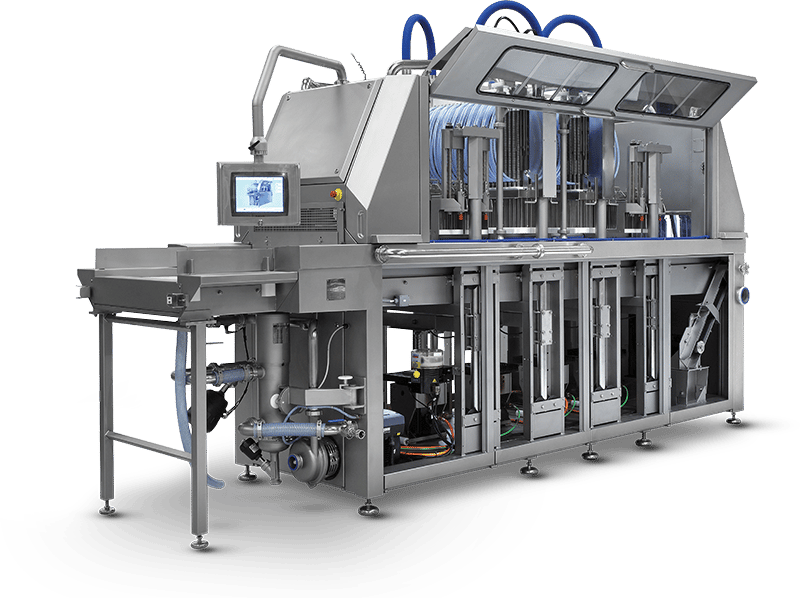
Customer Case
Fomaco's spare parts portal - powered by Truvio Commerce and Dynamics 365 F&O.
Fomaco manufactures food processing equipment used in production facilities around the world. Their customers and service partners need to identify and order the right spare part quickly — downtime in a food processing line is expensive.
Truvio's spare parts portal gives Fomaco's dealers and customers a self-service experience built directly on their product data and connected to their Dynamics 365 F&O environment. The right part, the right price, and the right stock level — without a phone call to Fomaco's support team.

Who is it for
If you build machines and your customers need parts, this is for you.
- Forestry & Harvesting Equipment
Harvesters, forwarders, and log loaders. High part counts, machine-specific configurations, and uptime requirements where the wrong part or a slow order costs real money. - Agricultural Equipment
Tractors, implements, and precision equipment. Dealer networks spread across regions, with parts managers, counter staff, and end farmers all needing different levels of access. - Marine
A vessel out of service is a vessel not earning. Accurate part identification and reliable ordering directly shortens the time between failure and fix. - Power & Industrial Equipment
Generators, compressors, lifting equipment, hydraulic systems. The same structured parts challenge — the same platform. - Other Manufacturing
If you have a dealer network or sell direct, serial numbers on your machines, and an ERP that owns your pricing and stock — this platform is built for you.

A Trusted Partner in the Microsoft Dynamics Ecosystem
We build solutions that align fully with Microsoft’s architecture, update cadence, and security standards. Truvio runs inside Dynamics 365, not alongside it, giving teams better performance, fewer integrations to manage, and an ERP foundation that stays current and grows with the business.