

Organizations should consider Truvio AP Automation when invoice volumes increase, approval cycles slow down, or manual AP processes start creating errors and bottlenecks. It is especially valuable for Business Central customers looking to improve control, visibility, and efficiency without adding complexity or external systems.
Where AP time goes in Business Central, and how Truvio gives it back?
Posting is rarely the problem. The work that slows AP teams down happens before an invoice ever reaches the ledger.

Retyping invoices
Invoices arrive as PDFs, scans and e-invoices. Truvio captures them and reads supplier, amounts and dates, so nobody retypes them into Business Central.
Chasing approvers
Approvals stall in email threads. Truvio routes each invoice to the right approver by your rules, with the invoice, amount and coding in one view.
PO mismatches
Price and quantity differences surface at payment time. Truvio matches invoices to purchase orders and receipts first, so only real exceptions reach you.
Status questions
Suppliers call and managers ask. Every invoice has a live status and full history in Business Central, so the answer takes seconds, not a search.

From inbox to posted invoice, inside Business Central
Four steps in one system. Your team only steps in when an invoice needs a decision.
-
1. Capture
Invoices arrive by email, as PDFs or in structured e-invoice formats. Key fields are extracted and checked against your Business Central data before anyone opens them. Truvio also fully supports e-invoicing in Business Central.
-
2. Match
Invoices are matched against purchase orders and receipts using rules you define. Invoices that match move straight on. Invoices that don’t are flagged with the reason.
-
3. Approve
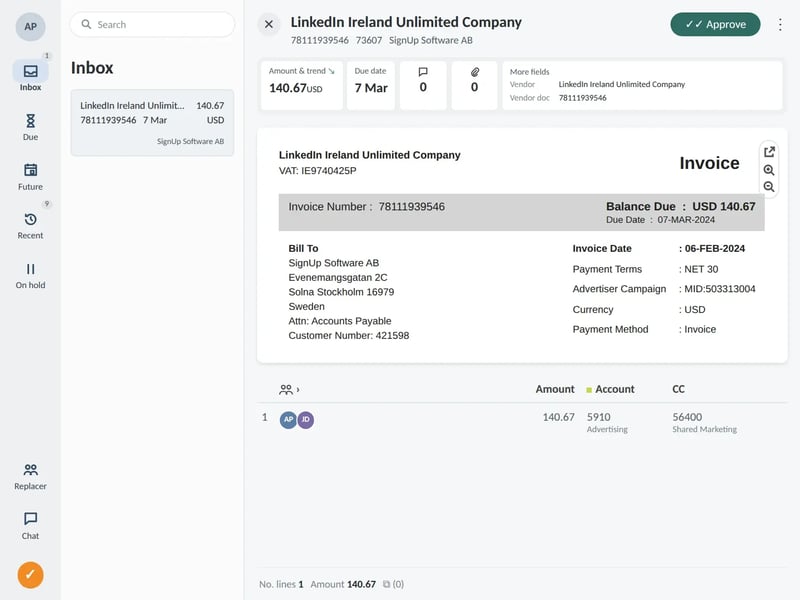
Your rules decide who approves what. Approvers see the invoice image, coding and amount together, and approve with one click.
-
4. Post
Approved invoices post directly in Business Central. There’s no rekeying and no double handling, and every action is logged for audit.

Automated Matching and Approval Workflows
Invoices are automatically matched against purchase orders and receipts based on your predefined rules. Truvio then routes invoices through configurable approval workflows, ensuring they reach the right approvers at the right time. This speeds up approvals, reduces bottlenecks, and maintains full compliance with internal controls and audit requirements.
Posting, Tracking, and Audit Transparency
Once approved, invoices are posted directly in Business Central without rekeying or duplicate handling. Finance teams can track invoice status in real time and access complete audit trails for every action. This improves visibility, supports audits, and helps your organization avoid late payments and missed discounts.