.svg "truvio_logo")


Data Capture powered by ExFlow
Invoice Data Capture Software for Microsoft Dynamics 365
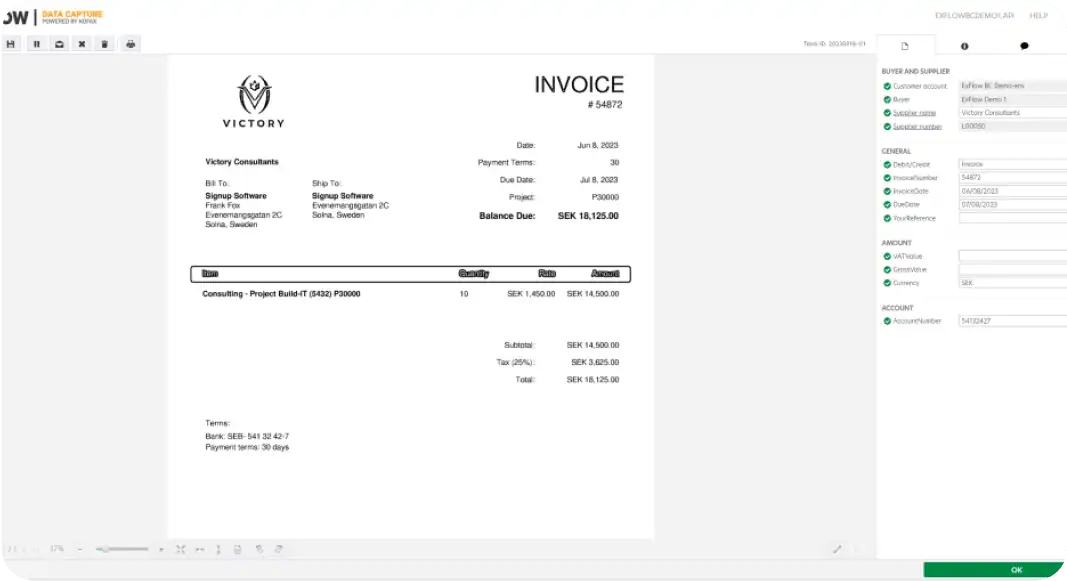
Truvio Data Capture powered by ExFlow is an automated invoice entry system that harnesses the power of Tungsten Automation, optical character recognition (OCR) technology, and advanced invoice capture capabilities. It is a well-established Azure-based solution with over 10 years of data.
Built for Dynamics 365 — Not Around It
About Truvio Data Capture
Manual invoice data entry is a tedious process. For AP departments it’s a time-consuming task with a high risk of errors. Flawed data input can lead to accounting errors, exceptions and data duplication. To automate the process, your team needs powerful invoice data capture software that seamlessly integrates with your accounting system.
Truvio Data Capture digitally formats and extracts data from invoices, improving accuracy, reducing errors caused by manual entry, and streamlining the accounts payable process.. With its intuitive interface and customizable features, invoice data capturing empowers businesses to achieve greater efficiency, compliance, and cost savings, allowing them to focus on what truly matters: driving growth and innovation.
Why Truvio Data Capture?
Capture Every Invoice Right the First Time
Truvio Data Capture automates invoice entry inside Dynamics 365, validating data against vendors, POs, and rules before approval. AP teams spend less time on manual checks and corrections, and more time on the work that drives the business forward.

Validated Data: Ensuring Accuracy from the Start
A key AP challenge is matching invoices to ERP records. Truvio automates validation against vendor data, POs, and rules, eliminating errors and manual checks for 100% accuracy before approval.
Fewer Errors, Faster Processing
Invoice errors can cause delays, compliance risks, and extra costs. Truvio's EDC flags issues like duplicates or mismatches in a clear dashboard, helping teams resolve them quickly and keep approvals on track.
Making Adjustments Is Simple and Efficient
Not all invoices are perfect—some may have missing or misread data. Truvio's user-friendly interface lets AP teams quickly edit or add info without disrupting workflows. It also learns from corrections, boosting accuracy over time.
Robust E-Invoice Support for Seamless Processing
As e-invoicing and regulations grow, Truvio EDC supports multiple formats like Peppol and Pagero, ensuring compliance across regions. It simplifies processing and cuts paper-based inefficiencies.
How Truvio Data Capture works
A more controlled path from bank files to reconciled activity. Use a secure banking integration layer to move payment and statement workflows into a more governed Dynamics 365 process.

1. Invoice Ingestion and Classification
The process begins when an invoice is received via email, electronic data interchange (EDI), or scanned from a physical document. Truvio invoice data capture software automatically detects and classifies the invoice based on format, vendor, and type. This initial step ensures that the invoice is correctly categorized before further processing, reducing errors and preventing mismatches.

2. Data Extraction and Validation
Once classified, the software extracts key invoice details, including invoice numbers, line items, tax amounts, due dates, and vendor information. Using optical character recognition (OCR) and machine learning, it identifies structured and unstructured data, for enhanced accuracy. It then cross-checks the extracted data against purchase orders (POs) or predefined rules, flagging discrepancies for review.

3. Integration with Accounting Software
After successful validation, the extracted data is transferred into the company's accounting software. The system matches invoice numbers to corresponding POs or receipts, automating the approval workflow. This step eliminates the need for manual data entry, thus reducing processing time and improving financial accuracy.

4. Approval Routing and Payment Processing
With all data validated and imported, the invoice follows a predefined approval workflow. The software routes invoices to the appropriate approvers based on amount thresholds, vendor policies, or cost center allocations. Once approved, the invoice is scheduled for payment, and payment status updates are automatically recorded in the accounting software for full visibility.
This structured workflow ensures that every invoice is accurately captured, processed, and approved, making invoice data capture software an essential tool for optimizing AP operations.
What's In It for You?
Less Manual Work, More Strategic Impact
From lower processing costs to stronger compliance and fraud protection, Truvio Data Capture turns everyday invoice handling into a source of efficiency, visibility, and confidence for your whole finance team.

Cost Reduction & Efficiency
Truvio Data Capture invoice capture software eliminates manual data entry, significantly lowering operational costs while boosting efficiency. By streamlining financial workflows, businesses can process invoices faster, reduce human errors, and free up valuable resources for strategic tasks.

Enhanced Financial Control
Gain greater control and visibility over financial workflows with automation that boosts compliance and accuracy. Clear audit trails, role-based approvals, and secure storage ensure every invoice is properly reviewed and recorded, improving cash flow and regulatory adherence.

Fraud Prevention & Security
Minimize the risk of fraud and unauthorized transactions with intelligent automation. Truvio Data Capture verifies invoices against company policies, flagging anomalies and duplicates in real-time. Built-in fraud detection, secure approvals, and digital audit trails add robust protection to your financial processes.

Global Support Network
Tap into our global partner network for expert support wherever you operate. Truvio Data Capture ensures smooth compliance with regional regulations, tax laws, and currencies, streamlining international operations. Our worldwide presence keeps your business informed, compliant, and ahead of the curve.

Real-Time Financial Insights
Get instant access to key financial data for faster, smarter decisions. Automated invoice capture offers real-time visibility into cash flow, spending, and liabilities. With dynamic reporting and analytics, finance teams can better manage budgets, forecast expenses, and spot savings opportunities.

Innovative Automation Features
Revolutionize financial management with advanced automation: AP automation, e-invoicing, and AI-driven data extraction. These tools streamline invoice processing for faster, more accurate results. By modernizing workflows, businesses boost productivity, cut admin tasks, and elevate financial performance.