.svg "truvio_logo")

What Is Payment Automation? Guide to Scale Payments Without Risk
Payment automation streamlines the full payment lifecycle in Dynamics 365 Finance, cutting manual work, fraud risk, and errors while improving control and visibility.

Payment automation is the use of technology to manage the entire payment lifecycle from proposal creation and approval through bank transmission, confirmation, and reconciliation with minimal manual intervention. The goal sounds simple: move money faster, with fewer errors, stronger controls, and complete visibility into every step.
If you lead finance or treasury, you already feel the pressure this creates. Payment volumes grow, banking relationships multiply, file formats change, and regulations evolve, yet the team responsible for executing payments rarely grows at the same rate. Something has to give. Too often, what gives is control.
One misconception I hear all the time is that payment automation simply creates a payment file faster. In reality, generating the file is the easy part. The real value lies in everything around the file: enforcing controls, removing manual touchpoints, preventing errors, and creating a secure, auditable process from end to end.
If you take away one thing from this article, make it this: every manual touchpoint in your payment process introduces delay, error, and risk. Payment automation removes those touchpoints, so your team can focus on exceptions instead of processing transactions.

What Is Payment Automation in Dynamics 365 Finance?
Microsoft Dynamics 365 Finance provides strong core payment functionality. But as organizations grow, the banking environment becomes more complex, and teams encounter requirements the platform alone was never designed to fully solve, particularly around bank connectivity, file transmission, multi-bank management, payment-status reporting, fraud controls, and end-to-end visibility.
Consider one task that is almost always manual today: payment file transmission. In many organizations, a user generates a payment file, saves it locally, logs into a bank portal, uploads the file, and then tracks the status through email and spreadsheets. Payment automation generates the file, validates it, securely transmits it to the bank, monitors delivery, and brings confirmations back into Dynamics 365 without anyone touching a portal.
Not every capability provides the same return right away. In my experience, the fastest return comes from automating payment proposal generation, payment file creation, bank transmission, and remittance emails. These eliminate repetitive manual work immediately. Capabilities such as payment-status reporting, positive pay integration, payment acknowledgements, and advanced fraud controls deliver significant long-term value, but they are typically not the first priorities during an ERP implementation.
The bigger challenge is scalability. In my experience, the challenge isn't just processing payments, it's scaling the process as payment volumes increase, banking relationships expand, and business requirements evolve. What works well today can quickly become difficult to manage as organizations add legal entities, bank accounts, payment types, file formats, and country-specific requirements. This is where manual work, risk, and operational bottlenecks often remain, even after a successful D365 implementation.
Where to start your own assessment: map how payments actually leave your organization today. Look for manual steps, spreadsheet tracking, portal logins, file uploads, approval bottlenecks, and any point where employees rekey information. Every manual touchpoint is both an inefficiency and a risk.
How Payment Automation Works
A well-designed automated payment workflow in a real Dynamics 365 environment runs end to end like this:
-
Approved invoices become eligible for payment.
-
A payment proposal is generated, manually by a user or automatically through scheduled processing, based on predefined payment criteria.
-
Validation catches missing or invalid banking information that could prevent successful processing.
-
Payment journals are reviewed and approved through standard D365 approval workflows.
-
Payment files are generated in the appropriate bank format
- Files are securely transmitted to the bank.
- Payment acknowledgements and status updates are received back from the bank.
- Payment journals are automatically updated and posted based on the bank response.
- Remittance advice is automatically emailed to vendors.
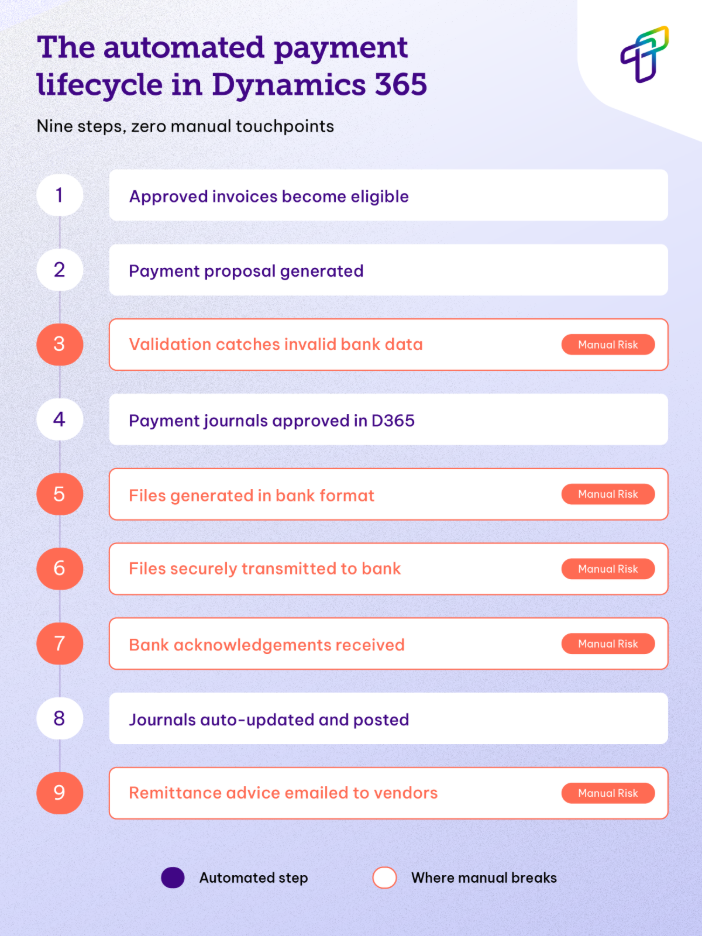
The steps that look simplest on paper are the ones that fail most often when handled by people instead of systems. The highest-risk areas are file handling and uploads, approval routing, bank portal activity, vendor payment changes, and payment-status tracking. Each of these typically depends on a specific employee, which becomes an operational liability the moment that person is unavailable or a process is followed inconsistently. This is also the gap fraudsters exploit: business email compromise, where an attacker poses as a vendor or executive to redirect a payment, remains the leading avenue for payments fraud, cited by 63% of organizations in the 2025 AFP Payments Fraud and Control Survey.
What most people never see are the checks happening behind the scenes. The system applies predefined rules to determine which invoices are eligible for payment and confirms the required banking information is present before anything is generated. Missing bank details, invalid payment data, or information that does not meet bank requirements are caught before files are created and transmitted. Just as importantly, the system maintains a complete audit trail of what was generated, transmitted, acknowledged by the bank, and posted back to Dynamics 365, the kind of evidence that turns a stressful audit into a routine one.
Why It Matters: Faster, Smarter Workflows
The case for automation is strongest when you put numbers to it. Independent benchmarking makes the gap between manual and automated operations hard to ignore.
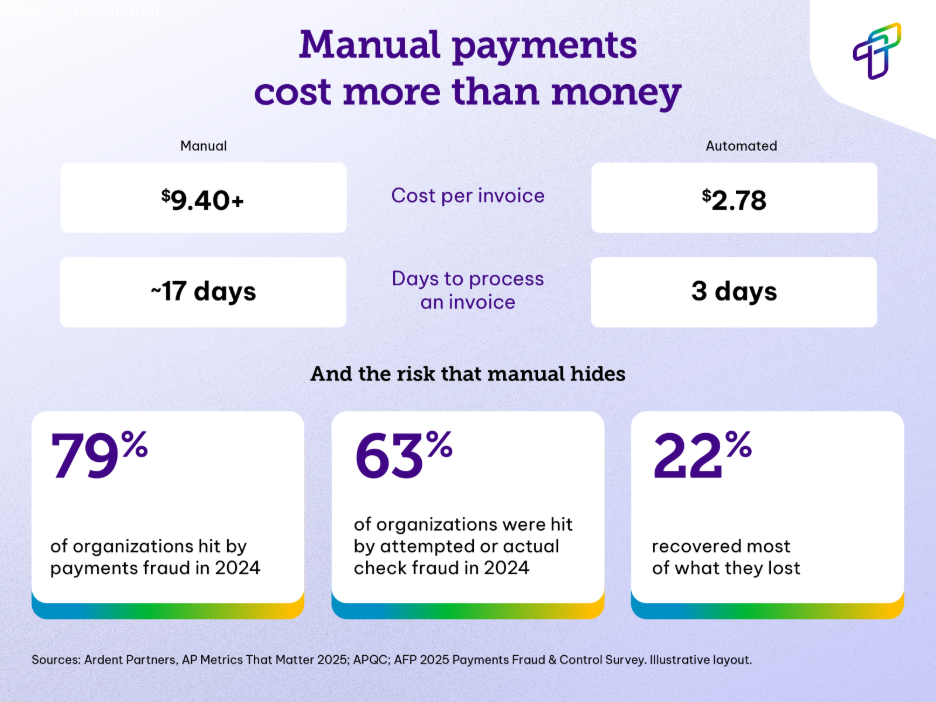
According to Ardent Partners' AP Metrics That Matter in 2025, best-in-class organizations process an invoice in roughly 3 days, while everyone else averages more than 17. The cost gap is just as stark: Ardent puts the average cost to process a single invoice near $9.40, with best-in-class performers closer to $2.78. APQC's benchmarking points in the same direction, its top performers process invoices at a median of about $2.45, compared with $10 or more for bottom performers. Multiply that across thousands of invoices each month, and the savings add up quickly.
The results I most consistently see after automation include:
- A significant reduction in payment processing time
- Fewer manual payment errors
- Less time spent working in bank portals
- Faster payment execution
- Improved audit readiness
- Greater visibility into payment status
Crucially, many organizations find they can support higher transaction volumes without adding finance headcount, the definition of scaling operations without scaling risk.
Automation also changes what a finance team actually does all day. Instead of generating files, uploading payments, answering status inquiries, and reconciling exceptions, the team shifts toward exception management, cash planning, vendor relationships, compliance, and strategic analysis. The role moves from transaction processing to financial oversight, which is where finance talent creates the most value.
A Final Word: Look Honestly at How Your Payments Move
If there is one action I would ask you to take after reading this, it is this: take an honest look at how payments move through your organization today. If they still depend on manual file handling, bank portal activity, spreadsheets, or email-driven processes, there is almost certainly an opportunity to improve efficiency, strengthen controls, and reduce risk.
The cost of manual payment processes are often hidden. They show up as extra effort, delayed payments, avoidable errors, fraud exposure, audit challenges and dependency on key individuals rather than as a single line item in the budget. The exposure is real: the 2025 AFP survey found that 79% of organizations experienced attempted or actual payments fraud, and only about one in five recovered the majority of what they lost. Meanwhile, federal regulators have reported a sharp rise in check-related suspicious activity even as overall check volume declines: a reminder that the riskiest payment habits are often the most familiar ones.
Organizations that delay automation usually find their payment processes get harder to manage, not easier, as volumes and banking complexity increase. Every manual touchpoint eventually becomes a bottleneck or a risk.
Sources
- Association for Financial Professionals (AFP), 2025 Payments Fraud and Control Survey Report — 79% of organizations experienced attempted or actual payments fraud in 2024; checks remain the most-targeted method (63%); business email compromise is the leading fraud avenue (63%); only ~22% recovered 75%+ of losses. https://www.financialprofessionals.org/training-resources/resources/survey-research-economic-data/details/payments-fraud
- Ardent Partners, AP Metrics That Matter in 2025 (State of ePayables) — best-in-class invoice processing time (~3 days vs. ~17 days); cost per invoice (~$2.78 best-in-class vs. ~$9.40 average); automation/AI adoption across AP departments. https://ardentpartners.com/ap-metrics-that-matter-in-2025/
- APQC, Accounts Payable Benchmarking — top performers process invoices at a median of ~$2.45 vs. $10+ for bottom performers. https://www.apqc.org/
- Federal Reserve Financial Services / FinCEN — rise in check-related Suspicious Activity Reports alongside declining check volume; B2B ACH growth. https://www.frbservices.org/news/fed360/issues/060325/check-fraud-remains-top-threat
- Institute of Finance & Management (IOFM) — AP automation adoption and productivity benchmarks. https://www.iofm.com/

You might also like this

The Only Comprehensive Guide to Accounts Payable (AP) Automation That You Need Right Now
When it comes to most business operations, you already know that efficiency is king. One of the most critical areas where your company can (and should...

What Is Three-Way Matching in AP Automation
An invoice lands for 500 units at $4.10 each. The purchase order said 480 units at $4.00. The warehouse received 480. Pay that invoice as written and ...

Measuring Manual Invoice Costs in Dynamics 365
Most finance teams know manual invoice handling is expensive. Very few can tell you by how much. That gap is why automation stays a "someday" project:...