.svg "logo (1)")

Why Truvio Data Capture?
Truvio Data Capture uses AI to automate how invoice data is captured, validated, and transferred into Dynamics 365 Business Central, turning unstructured documents into reliable, ready-to-use data with minimal human intervention.

AI-Driven Accuracy
AI continuously learns from invoice patterns and historical data to accurately extract header and line-level details, reducing errors, rework, and dependency on manual corrections.
Faster AP Processing
Automated data capture removes time-consuming manual entry, enabling invoices to move seamlessly into approval workflows and helping your AP team process higher volumes without added effort.
Native Business Central Integration
Built specifically for Dynamics 365 Business Central, captured data flows directly into your ERP, preserving data integrity, improving visibility, and supporting a scalable, future-ready AP automation strategy.

How AI Data-Driven Data Capture Works in Business Central
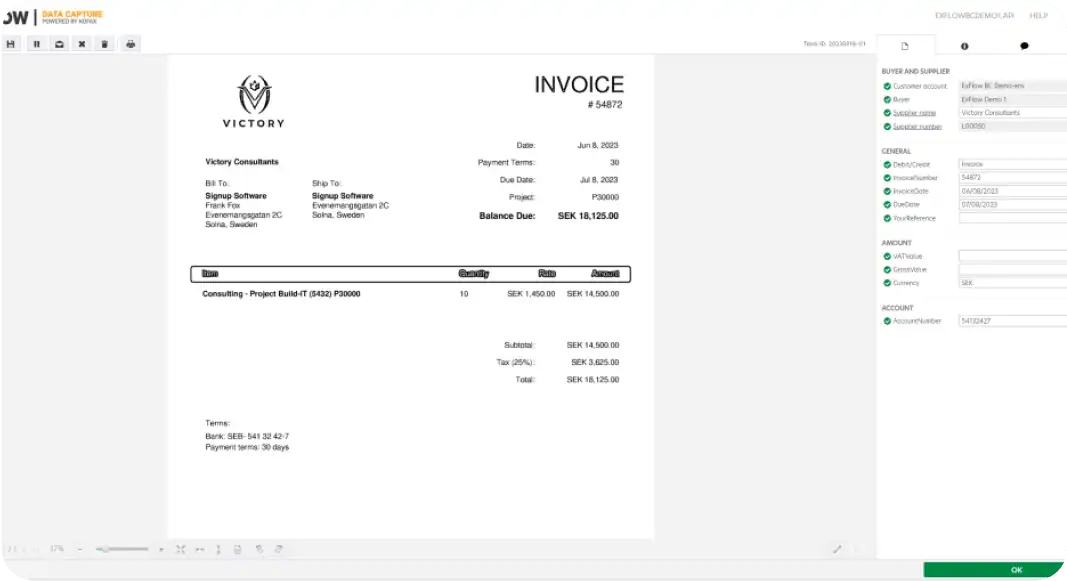
Truvio Data Capture uses AI and intelligent document processing to transform incoming invoices into structured, validated data directly in Dynamics 365 Business Central. By automating capture, interpretation, and validation, finance teams gain faster processing, higher accuracy, and a scalable foundation for AP automation.
Intelligent Invoice Capture
Invoices are captured automatically from multiple sources, including email, PDF, and scanned documents. AI recognizes invoice layouts, suppliers, and formats, extracting header and line-level data with high precision. This removes the need for manual keying and ensures consistent data capture, even when invoice formats vary widely between vendors.

AI-Based Data Validation
Captured data is validated in real time against Business Central master data, such as vendors, purchase orders, and dimensions. AI flags missing or inconsistent information early in the process, reducing downstream errors and rework. As the system learns from corrections and usage patterns, accuracy continues to improve over time.
Native ERP Inclusion
Validated invoice data is transferred directly into Dynamics 365 Business Central, ready for posting or approval workflows. Because data capture is natively aligned with Business Central processes, finance teams benefit from full visibility, auditability, and a smooth handoff to accounts payable automation without manual intervention or external data handling. This AI-driven approach enables faster invoice cycles, stronger data quality, and a future-ready AP process built for growth.

FAQ
1.) When should organizations consider Truvio Data Capture?
Organizations should consider Truvio Data Capture when manual invoice entry slows AP processes, causes errors, or limits scalability. It is especially valuable as invoice volumes grow or when teams want to automate data capture without adding complexity to Business Central.
2.) What types of invoices can Truvio Data Capture handle?
Truvio Data Capture supports PDF, scanned, and digital invoices from multiple suppliers. AI adapts to varying formats, capturing both header and line-level data with high accuracy.
3.) How does Truvio Data Capture improve over time?
AI learns from corrections and usage patterns, continuously improving data extraction accuracy. This ensures better results over time while reducing manual intervention and rework.